How to Reset an LG Refrigerator Water Filter (Panel Method + ThinQ App)

In short: press and hold the Filter (or Water Filter / Filter Reset) button on the dispenser panel for 3–5 seconds until the indicator turns off — and if your LG is a ThinQ-connected model, the app can show and reset filter status too. LG’s own filter guidance specifies the 3–5 second hold; the exact button label depends on panel generation, and this page covers all of them plus the flashing-light scenario that sends LG owners to JustAnswer.
LG is also the brand with a 2025 gotcha worth knowing before you buy your next cartridge — a notch change on some cartridge generations that affects which housing they seal into. It is in the buying section below, because a reset guide that ignores compatibility is half a guide.
Quick Answer

| Your LG panel | Reset method |
|---|---|
| Dispenser panel with Filter button | Press and hold 3–5 seconds until the light goes out |
| Panel with Filter Reset label | Press and hold 3 seconds |
| ThinQ app (connected models) | App → your refrigerator → settings/consumables → Filter Reset |
| Status flashing instead of solid | See the flashing section — it changes the diagnosis |
Why the Light Is On: A Timer, Not a Test
The filter indicator on LG refrigerators counts time (and on some models, estimated usage) from the last reset. It does not sample your water. When the countdown ends, the light comes on and stays until you clear it — installing a new cartridge alone does not do so, with a few model exceptions that auto-detect.
The flow that works every time: replace the cartridge, flush the line (2 gallons is LG’s typical guidance — see our flush guide), then hold the reset until the indicator clears. Treat replace-flush-reset as one transaction.
Method 1: The Panel Hold (Works on Nearly Every LG)
- Locate the Filter / Water Filter / Filter Reset button on the dispenser panel — the same surface as your water/ice selections.
- Press and hold. LG’s guidance specifies 3–5 seconds; some panels want the full five.
- Watch the indicator: it blinks or turns off to confirm. If the display shows filter life as a percentage or bar, it returns to full.
Common failure: releasing at one second. A quick tap changes the filter mode or does nothing; only the sustained hold registers as a reset. Count “one-thousand-one, one-thousand-two, one-thousand-three.”
Method 2: The ThinQ App (Connected Models)
If your fridge is registered in the LG ThinQ app, the app mirrors the appliance state and can trigger some controls remotely. The general path:
- Open ThinQ and select your refrigerator.
- Look in the appliance’s settings or consumables/filter area for Filter Reset (menu placement varies by app version — it has moved between updates).
- Tap reset; the app relays the command and the panel status updates within a few seconds.
Two honest notes. First, the app is a convenience, not a different mechanism — it sends the same reset command. If the panel ignores a physical hold, the app usually hits the same wall, and the 5-minute power cycle (below) is the next step. Second, the app’s filter status is only as current as its sync; after any reset, glance at the physical panel to confirm the light actually cleared.
Flashing vs. Solid: Two Different Situations
LG owner traffic on this topic splits into two camps, and the distinction matters:
- Solid light = expired countdown. Routine. Replace, flush, hold reset, done.
- Flashing light (often with the fridge beeping or the status stuck mid-reset) = the panel is waiting for an acknowledgment or a reset did not complete. The flashing state is exactly the scenario in the JustAnswer threads that rank for this topic. What clears it, in order: run the full 3–5 second hold again; if it persists, power-cycle the fridge (breaker off, 5 minutes) — flashing status after a partial reset is a panel-state issue more often than a filter issue; if the panel also misbehaves elsewhere after reboot, it is a control/display problem, not a filter problem.
The Reset Won’t Stick: Four Causes
- Hold too short. 3–5 seconds, counted. The most common cause by far.
- Panel needs a reboot. Breaker off 5 minutes, retry. Fixes frozen panels that display fine but ignore input.
- Cartridge not seated. LG’s twist-lock cartridges (LT-series) must rotate fully into the head. A cartridge a quarter-turn short can keep the status from clearing. Reseat, then reset again.
- Wrong indicator. Some LG models show an icemaker or water-line status near the filter light. Confirm the icon you are clearing is the filter cartridge symbol.
All-brands deep dive: filter light stays on after replacement.
Before You Buy the Next Cartridge: The 2025 Notch Change
Compatibility data we track includes a caution flag on some LG cartridge generations: a notch (cutout) design change around 2025 means certain newer-revision cartridges and older filter housings do not line up the way the part numbers suggest. A cartridge that fits the family but has the wrong notch revision can seat badly — which then masquerades as a reset problem (Cause 3 above) or a leak.
Practical rules:
- Order by the exact part number on your old cartridge (LT1000P / LT700P / LT500P families), not by fridge model nickname.
- If a new cartridge refuses to seat or the housing will not lock, do not force it — check the notch position against the old cartridge before applying muscle. Force breaks filter heads, and a broken head is a service visit.
- Mixing generations is exactly the scenario in our post-replacement leak diagnostics.
Cartridge Basics and Prices
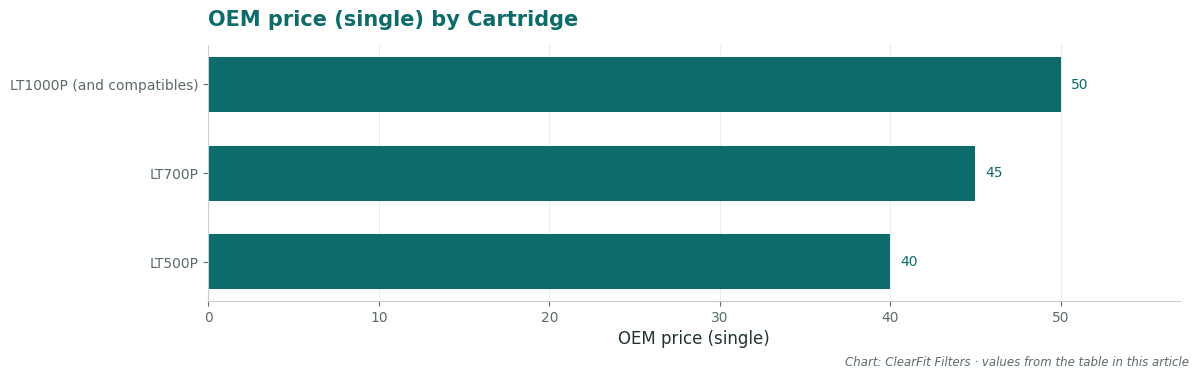
| Cartridge | Typical fit | Capacity class | OEM price (single) |
|---|---|---|---|
| LT1000P (and compatibles) | Current French door models — the workhorse | 200 gal class | ~$45–55 |
| LT700P | Compact/some side-by-side | 200 gal class | ~$40–50 |
| LT500P | Older/smaller models | 200 gal but physically smaller media — real life runs shorter under heavy use | ~$35–45 |
Capacity matters for your reset cadence: an LT500P in a four-person household with heavy ice use can exhaust its carbon well before the six-month light. How long a filter really lasts has the four variables and a household-size table.
Compatible-cartridge honesty, same as every page we publish: OEM LG cartridges are NSF 42/53 certified; third-party options vary, with standard-tier compatibles carrying NSF 42 and premium tiers adding NSF 53. Check the certification block before buying — the price gap between an $18 compatible and a $50 OEM should be a decision made with eyes open, not in the dark.
FAQ
Do LG fridges auto-reset when you install a new filter? Most do not — the hold (or app command) is expected. A few newer models detect cartridge changes; if yours cleared itself, you are done, but do not plan around it.
The ThinQ app shows a different filter status than the panel. Which is right? The panel. The app syncs periodically and lags. Reset via one, confirm on the other.
How long should I flush after replacing before resetting? Flush first (about 2 gallons on LG — the flush page has per-brand volumes), then reset. Order does not technically matter, but flushing before you touch any buttons means one trip to the fridge, not two.
My filter light came back on after only 3 months. Broken timer or real problem? Check whether the reset actually took after the last change (a reset that never registered resumes the old countdown). If it took, heavy usage on a smaller-capacity cartridge can genuinely finish early — see the capacity section above.
Can I reset without replacing to quiet the light temporarily? You can, but you are disabling your only reminder while running aging carbon. If the goal is breathing room until payday, our bypass guide is the honest version of that conversation.
What This Page Gives You That the Others Don’t
- Both reset paths in one place — the 3–5 second panel hold (per LG’s own guidance) and the ThinQ app route, with the caveat that the app sends the same command as the button.
- The flashing-vs-solid distinction that separates a routine countdown from the stuck-state scenario filling the JustAnswer threads.
- The 2025 notch caution with a do-not-force rule — a compatibility fact that most reset guides (and some product listings) skip entirely.
- Capacity-based reset cadence — why LT500P households hit the light early and what to do about it.
- Per-SKU certification honesty instead of a blanket “same quality as OEM” claim.
Sources & References
- LG support guidance on filter replacement and the 3–5 second panel hold (LG Help Library and LG’s “find the correct filter” page).
- LG ThinQ app behavior per community reports and JustAnswer threads (flashing indicator scenarios), labeled as community evidence.
- Notch-revision caution from our internal compatibility-risk tracking, flagged as a verify-before-install item.
Related Guides
- How to Change an LG Refrigerator Water Filter
- Where Is the LG Refrigerator Water Filter?
- LG Water Filter Bypass Plug
- Filter Light Stays On After Replacement — All Brands
- How Long Should a Refrigerator Water Filter Last?
Find your replacement: LG refrigerator water filters · LT500P – exact-fit chart